
1. Compatibility
1.1 Not compatible
-
Solis S6-EH3P-LV
-
Solis S6-EA1P
-
Solis S6-EA3P
We want to transparently inform you about the status of the Solis inverter S6-EA integration, which is not progressing as hoped.
We are experiencing inconsistency in the naming of the models and the applied power ratings. We also find that there are too many issues to reliably and smoothly connect these models with FlexiO.
-
FlexiO detects 5kW for example, but the inverter can actually only charge and discharge 3kW.
-
There is a 1/3 chance of an incorrect firmware version, causing the inverter to be uncontrollable via Modbus.
Therefore, we explicitly ask not to install Solis S6-EA inverters in combination with LIFEPOWR until a solution is provided by the manufacturer.
Important for installers:
Additionally, there are Solis inverters circulating with model RAI nameplates that are actually the S6-EA1 model. Make sure to verify when purchasing your devices if you have proposed a FlexiO configuration to the end user.
The correct model is always displayed via IO diagnostics. Ensure this matches the nameplate on the inverter to avoid misunderstandings with the end customer.
1.2 Compatibel
-
Solis S6-EH1P
-
Solis S6-EH3P
-
Solis S6-EH1P(3-10)K-L-PLUS
2. Solis S6: 2 communication ports (COM1 and COM2)
1.1 COM1 port (preferred)
This communication port is used to connect the Solis inverter to the FlexiObox true RTU. We highly recommend using this type of connection as this is more stable and reliable.
1.1.1 RTU Connection
The connection between FlexiObox and Solis inverter will be established by an adapted serial cable (SFTP) and a LMGS adapter which you can find in the Lifepowr webshop.
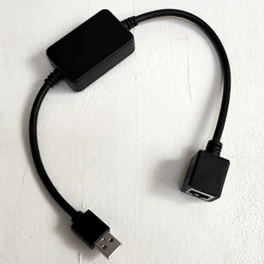
Related: Where to order these products.
Depending on the model, the wires need to be connected differently.
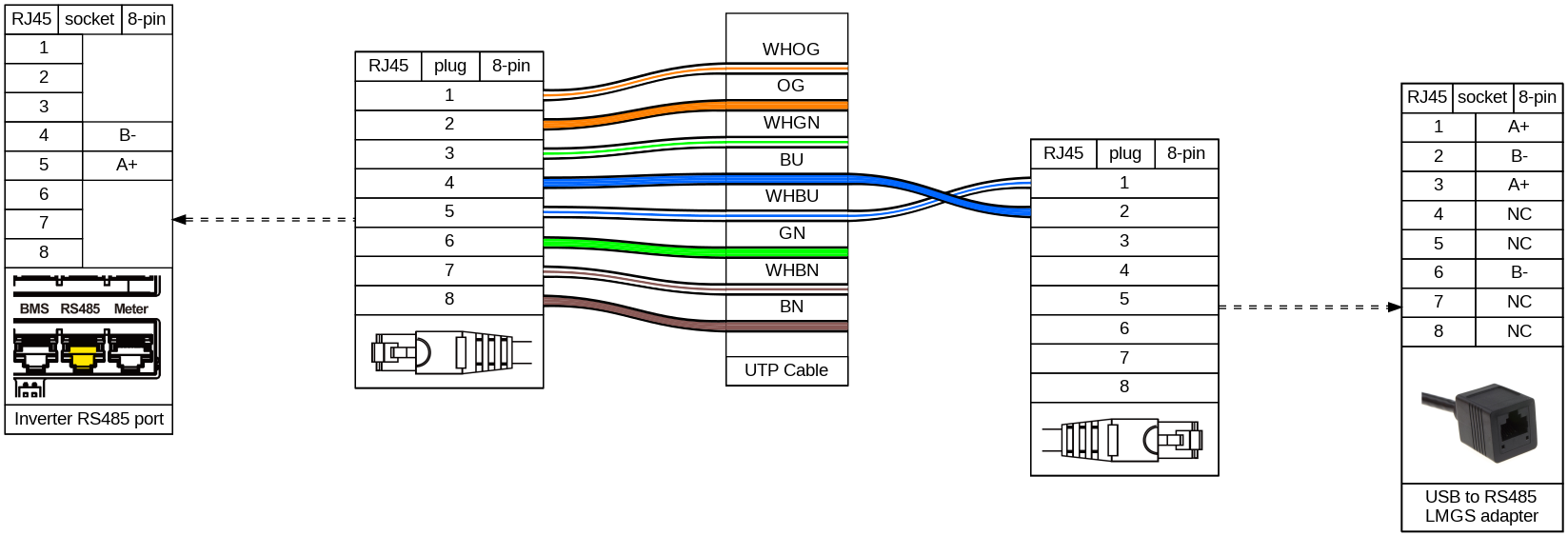
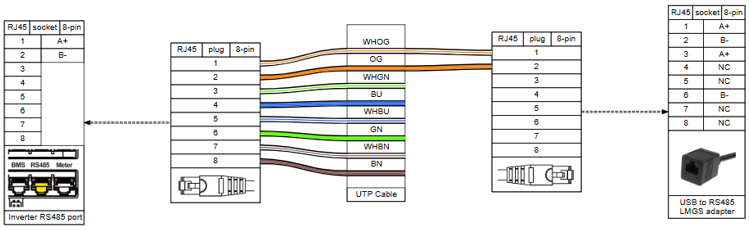
1.1.1.1 S6-EH3P (5-10)K and S6-EH3P (30-50)K
Strip one side of the SFTP cable and attach a new RJ45 connector connecting only Blue/white to pin 1 and Blue to pin 2
1.1.1.2 S6-EH3P (12-20)K
Strip one side of the SFTP cable and attach a new RJ45 connector connecting only Orange/White to pin 1 and Orange to pin 2
1.2.1 Connection to the inverter and FlexiObox
-
Insert the standard side of the SFTP cable (8 wires) into the RS485 port of the inverter
-
Connect the adapted RJ45 connector (2 wires) into the LMGS adapter
-
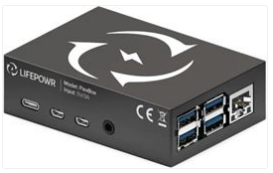
Insert the USB side of the LMGS adapter in one of the 4 USB-ports of the FlexiObox
2.1 COM2 port
2.1.1 Solis Datalogger S2 WL ST
The connection of the Solis Datalogger will mainly serve for Solis Cloud. In case a problem occurs with the RTU connection on COM1 port, FlexiO can switch to the COM2 port and use the datalogger for it’s connection to FlexiO.
-
Strongly recommened to connect the datalogger with an UTP cable to establish a wired internet connection for the inverter. A wifi connection is possible however subject for less qualitative and less stable connection.
-
The datalogger will send data to SolisCloud and FlexiO combined.
-
Important to upgrade the Solis datalogger to firmware 100.121.CF.
A firmware upgrade needs to be requested at Solis support. Unfortunately at this moment it is not possible to execute this as 3rd party.
3. Solis Brand documents
4. Technical support
Visit the support page.