Why is my installation temporarily paused for grid balancing?
To ensure that grid balancing functions properly, LIFEPOWR continuously monitors the quality of the FlexiO control system.
If we determine that an installation is temporarily unable to participate reliably in grid balancing, the rPOWR service (grid balancing based on frequency control) is temporarily paused.
We do this to ensure the stability of the electricity grid and to ensure the correct and safe operation of your installation.
When rPOWR pauses temporarily, FlexiO stays active. Your installation continues optimising your consumption and cost savings, as long as the technical situation allows it.
What does this mean for you?
-
Your installation is temporarily not participating in grid balancing.
-
During this period, there may be less or no income from grid balancing.
-
As soon as the technical quality is sufficient again, the service will be automatically reactivated.
🧰 What can you check as a customer
1. Check if the FlexiObox is online
👉 Troubleshooting guide:
FlexiObox | Offline
2. Check if the steering is active
If the FlexiO steering is inactive:
Check the FlexiO app for a measurement from the inverter and battery.
If there is no data from the inverter, the communication between inverter and FlexiO is lost.
-
Check the physical connection between the inverter and FlexiO
-
reboot your router and/or networkswitch
-
reboot your inverter
Powerline adapters and WiFi extenders are NOT allowed between the FlexiObox, networkswitch and the inverter.
A direct wired Ethernet (UTP) connection
-
FlexiO and inverter connected:
-
directly to each other, or
-
to the same router or network switch
-
3.Verify the P1 port connection
FlexiO relies on real-time data from the P1 port of the digital meter.
Please verify:
-
The P1 cable is firmly connected to the digital meter
-
The other end of the cable is correctly connected to:
-
the FlexiO box, or
-
a P1 dongle (e.g. HomeWizard), if used
-
-
The P1 port is activated by your grid operator
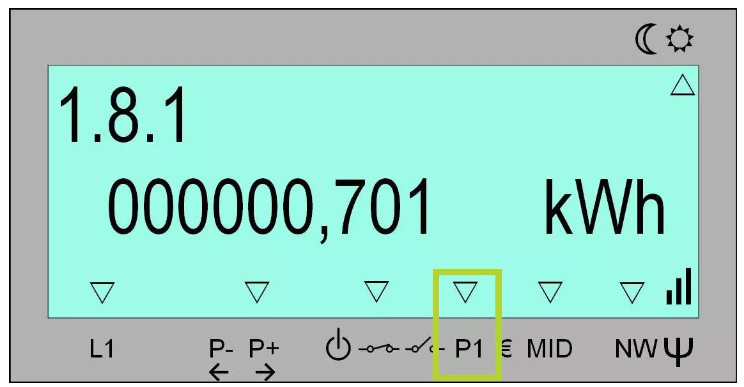
Arrow at P1 (or GP) is activated
If you use a HomeWizard or similar P1 dongle:
-
The dongle should have green light
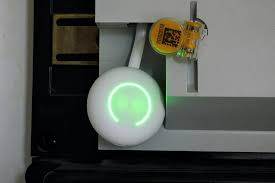
-
Open the HomeWizard app
-
Verify that you can see:
-
current consumption
-
grid import/export
-
voltage and frequency (if available)
-
If this data is missing or unstable, FlexiO cannot operate reliably.
👉 Troubleshooting guide:
P1 no device installed
4. What happens next?
Once the communication and measurement quality are restored:
-
LIFEPOWR automatically verifies system stability
-
rPOWR grid balancing is reactivated automatically
A manual request for reactivation is not required. The user will receive an automatic email when balancing is active again or further action is needed.
These checks run weekly.
Key takeaway
-
Reliable meter data and stable local networking are essential
-
P1 data must be active and visible
-
Powerline and WiFi solutions between FlexiO, networkswitch and inverter are a NO-GO
-
Temporary pauses do not mean your system is faulty
-
Smart energy control remains active where possible