Legend: ✅ recommended · ⚠️ caution · ❌ not allowed
FlexiO works reliably as long as two things are in order: a good internet connection, and a fixed wired connection to the inverter. This page explains how to connect that correctly, with three possible setups in order of preference.
Two fixed rules
-
The FlexiObox always needs a stable internet connection.
-
The connection between FlexiO and the inverter (Modbus) is always fixed wired — no Wi-Fi, no Wi-Fi extenders, no powerline adapters.
ℹ️ Guiding principle: keep the wired path between FlexiO and the inverter as short as possible, and keep the setup simple. An unstable connection leads to measurement dropouts and messages like "Quality Of Signal too low"; some inverters are more sensitive to this than others.
All three options below comply with these two rules. They differ only in how you wire and when you should choose them.
✅ Option 1 (recommended) — FlexiObox as a switch with TP-Link UE300
The FlexiObox has one built-in Ethernet port. With a TP-Link UE300 (USB to gigabit Ethernet) you add a second wired port. The FlexiObox then works as a small switch: it receives internet on the built-in port and passes it on to the device via the UE300. This creates a short, direct cable connection between FlexiO and the inverter or charging station, without extra devices or power outlets.
The UE300 is approved by LIFEPOWR and the drivers are already on the FlexiObox. The connection is plug-and-play: as soon as you connect an Ethernet device via the UE300 (inverter or charging station), FlexiO recognizes the adapter and automatically assigns the device a correct IP address. You don't have to configure anything.
ℹ️ FlexiO supports multiple UE300 adapters simultaneously — for example, one for FlexiO ↔ inverter and a second for FlexiO ↔ charging station.
Required materials
-
TP-Link UE300 USB-to-Ethernet adapter (approved by LIFEPOWR).
-
Ethernet cable, minimum shielded Cat5e or Cat6 (STP/FTP). No maximum length, but the shorter the better.
-
Internet source directly from the modem/router.
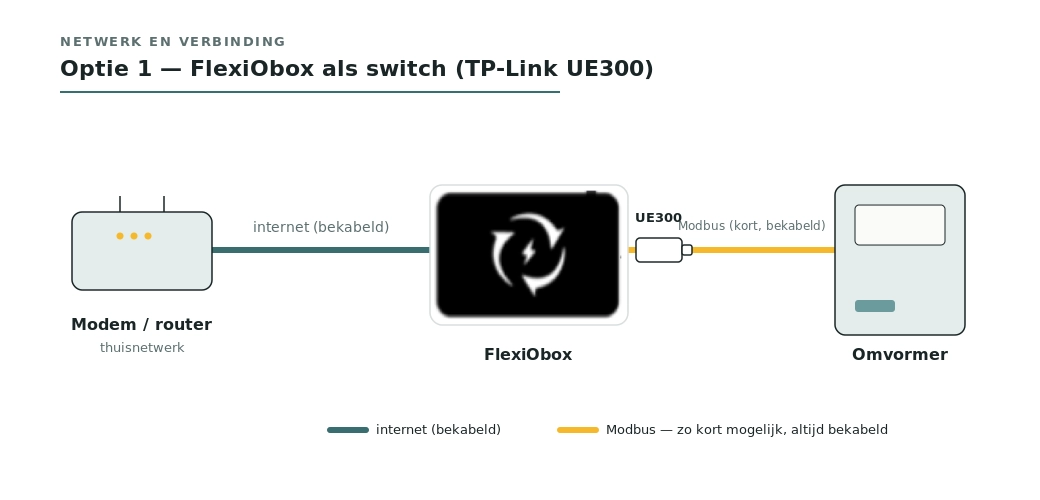
Connection (see Image 1)
-
Modem/router → Ethernet cable → built-in port of the FlexiObox (internet).
-
UE300 into a USB port of the FlexiObox.
-
UE300 → short, shielded Ethernet cable → network port of the inverter or charging station.
-
Done — FlexiO recognizes the adapter, assigns an IP, and bridges the ports automatically. Multiple devices? One UE300 per device.
-
Check in the IO diagnostics that the connection is stable.
Option 2 — Network switch in the technical room
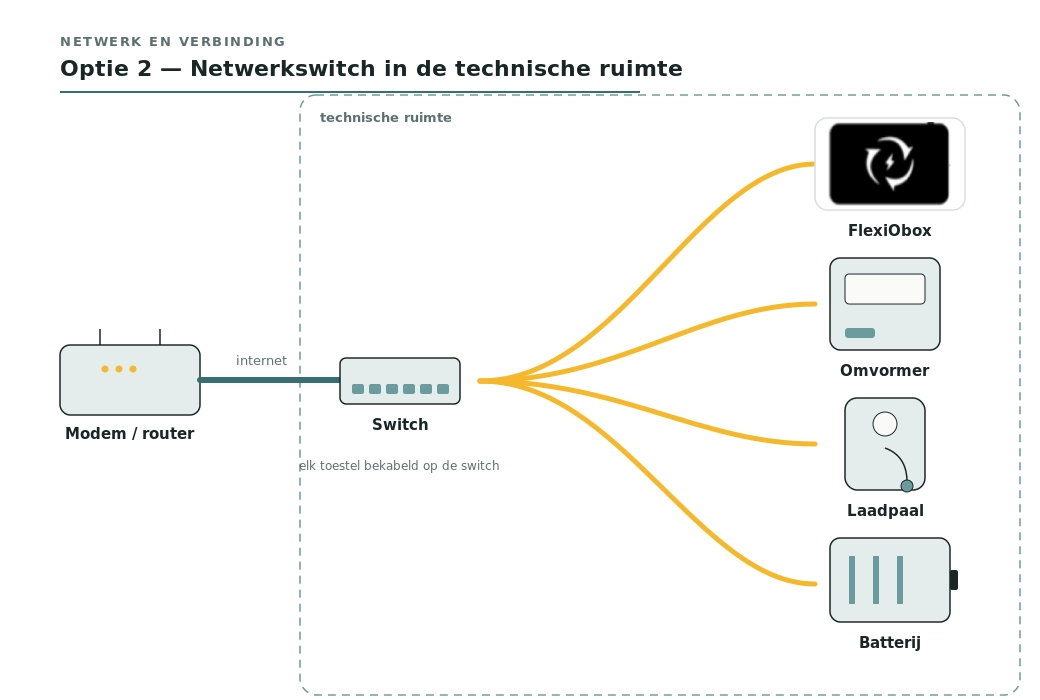
One fixed internet cable runs from the modem to the technical room. There you place a network switch, and all participating devices come together on that switch: the FlexiObox, the inverter, and optionally the charging station and the battery. This way, all controlled connections are together and the path to the inverter remains short. (see Image 2)
Choose this setup when there are multiple network devices in the technical room, or if you prefer to work with a regular switch instead of USB adapters.
Required materials
-
One fixed internet cable from the modem to the technical room.
-
A gigabit network switch with power supply.
-
Short, shielded patch cables (Cat5e/Cat6) from the switch to each device.
Option 3 — Direct wiring to the modem
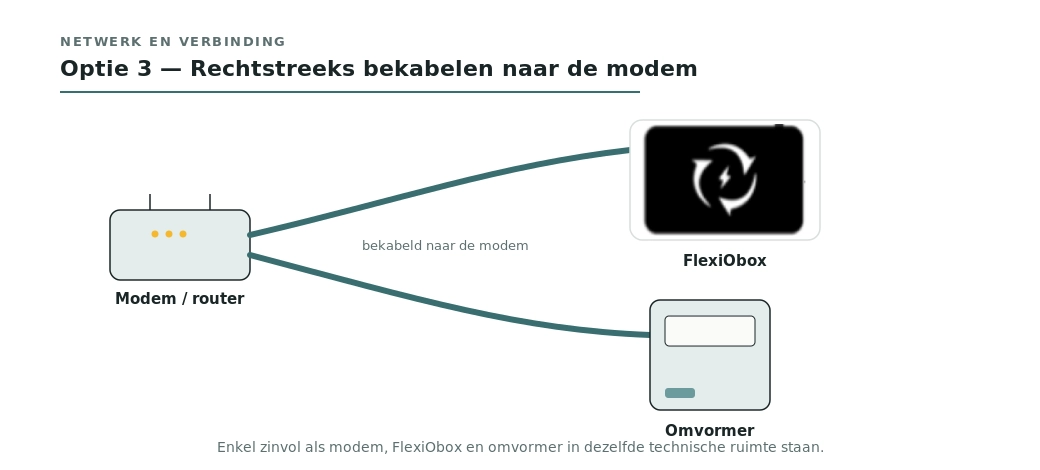
Each device gets its own cable directly to the modem/router. (see Image 3)
-
✅ Good when the modem is in the same technical room as FlexiO and the inverter. Then this is the simplest setup — no extra switch or adapter needed, and the path to the inverter remains short.
-
⚠️ Not recommended when the modem is far away in the house. Then there is both a long cable modem → FlexiO and a long cable modem → inverter needed. This increases the chance of disturbances on the Modbus signal.
-
No Wi-Fi, Wi-Fi extenders or powerline between FlexiO and the inverter or charging station. This is the main cause of an unstable connection.
Images
-
Image 1 — Option 1: modem → fixed cable → FlexiObox → UE300 → inverter or charging station (possibly two adapters).
-
Image 2 — Option 2: modem → fixed cable → network switch in the technical room → FlexiObox, inverter, charging station and battery.
-
Image 3 — Option 3: each device directly to the modem (only sensible if everything is in the same room).