
This integration guide is compatible with the following Growatt products:
1. Modbus support
1.1. Modbus TCP
The key points are:
-
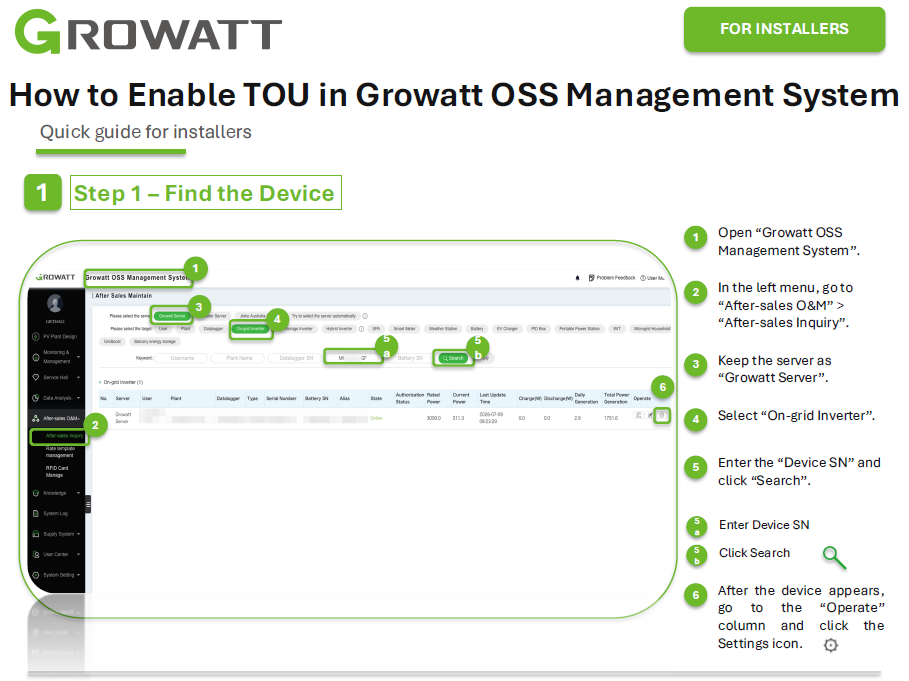
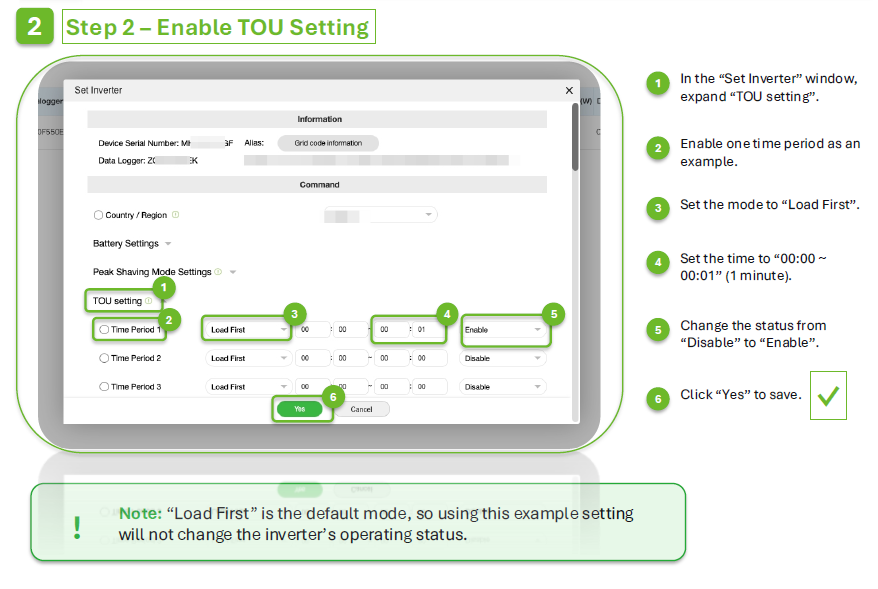
Go to the inverter setting page in the Growatt OSS system.
-
Open the TOU setting section.
-
Enable one TOU time period.
-
Set the mode to Load First (other is fine).
-
Set a short time range, for example 1 minute (other timezone is fine).
-
Change the status from Disable to Enable.
-
Save the setting.
2.1. Modbus RTU
2.1.1. RTU using LMGS
For the connection between the FlexiObox and the inverter, you can use the SFTP cable.
Schematic looks like this: inverter - SFTP – LMGS – FlexiObox
The intention is to cut off the 2 RJ45 connectors and use a pair (e.g. Blue and blue/white) in the cable for the connection.
-
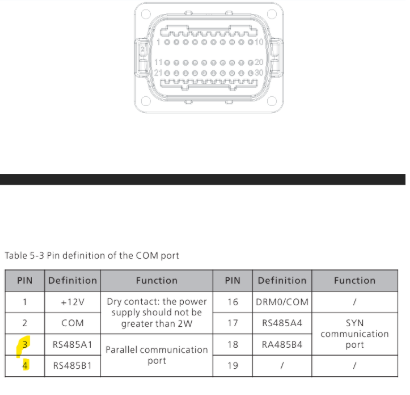
Inverter side:
Blue/white in port 3
Blue in port 4
-
FlexiObox side:
The other side of the SFTP cable needs to be cut and a new RJ45 connector needs to be placed:
-
blue/white on pin1
-
blue on pin2
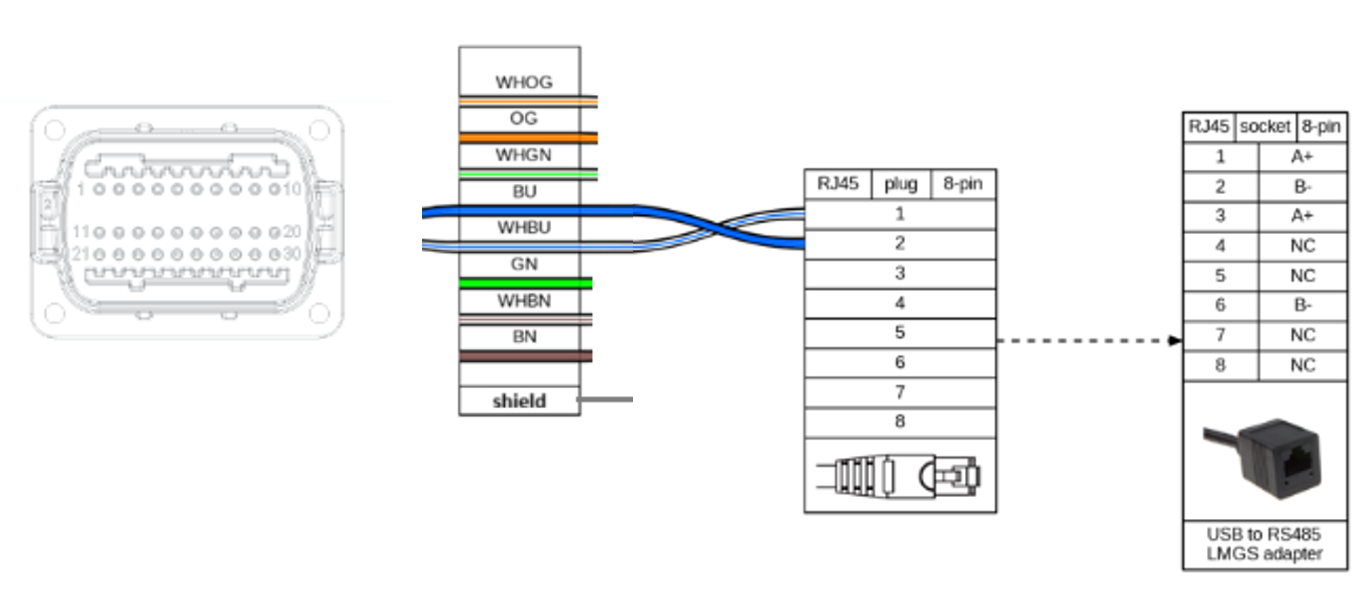
The new RJ45 connector goes into the LMGS adapter
The USB can be plugged into one of the 4 ports in the FlexiObox.
2.1.2. Alternative solution using LMA1
Schematic looks like this: inverter - SFTP – LMA1 - LMGS – FlexiObox
The intention is to cut off the 2 RJ45 connectors and use a pair (e.g. Blue and blue/white) in the cable for the connection.
-
Inverter side:
Blue/white in port 3
Blue in port 4
-
FlexiObox side:
-
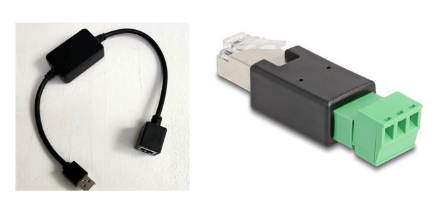
Connect to the inverter using the Black Dongle [LMGS] combined with the RTU adapter [LMA1].
-
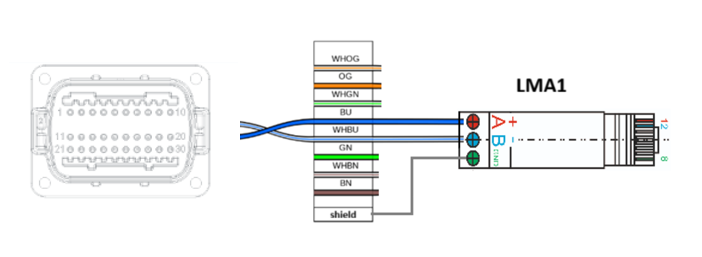
Strip an SFTP/UTP cable on both ends.
-
Connect the blue wire to the A connection of the LMA1 adapter. And the blue/white wire to the B connection.
-
Connect the LMGS with the LMA1 dongle.
-
Finally, connect the USB end of the LMGS dongle to an available USB port on the FlexiObox.
3. Necessary firmware upgrade
Regarding SunSpec compatibility: only devices with ZBDC firmware can be upgraded to version ZBDC0016 or higher, which supports the SunSpec protocol.
-
If the unit is already a ZBDC version, it can be directly upgraded to the specified firmware version (≥ ZBDC0016) for SunSpec support.
-
If the unit is a ZBDB version, then the production date needs to be checked:
-
For production after May–June 2023, the inverters are already built with the larger memory chip. In this case, they can be flashed with an intermediate software to migrate to ZBDC, and then upgraded further.
-
For earlier production, the smaller memory hardware does not support upgrading to ZBDC, so SunSpec cannot be enabled.
-
This check can usually be done in advance through the SN query in OSS, so the installer knows before installation whether the upgrade path is possible. The figure below shows the version number retrieved through the SN.
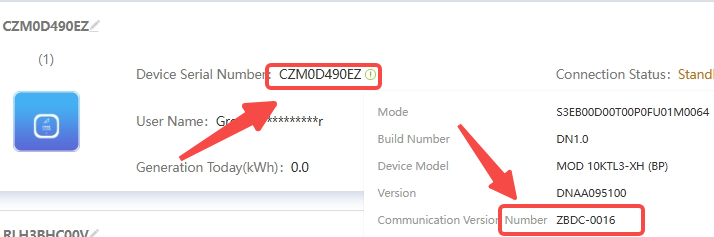
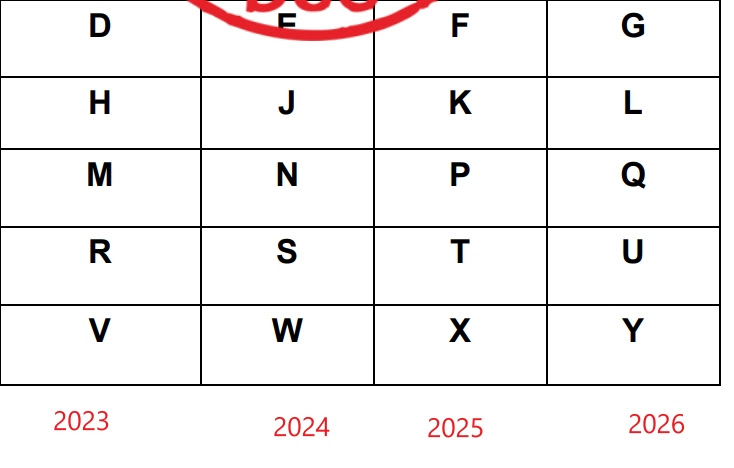
Using the serial number and the schema below, you can check the production date.
Example: CZM0F4F07L
-
5th character is the year -> CZM0F4F07L (year; 2025)
-
6th character is the month -> CZM0F4F07L (month; April)

4.Brand documents